

That ShopSpezial saying it is CaliSfo's idea... I say we break his legs, or just shoot him 18 times in his knees.
Edit: I posted at NFS-Center to accouse him. Let's see what comes up:
http://www.nfs-center.de/forum/showthre ... post104331
Hey check this out it's camaro in career WTF??

Nonono, I don't say to Steffi that it was my idea! She just just mentioned that I've got nothing to do with this! I didn't say anything to her and also I ever posted that the list was from STAT-X!
MfG CaliSfo
EDIT: Another thing. It would be great if you could delete my account! For those stupid games I don't have the desire. Cause Koffy don't know what about he's speaking, I ever said that it was STAT-X carlist. But enough, please delete my account.
MfG CaliSfo
EDIT: Another thing. It would be great if you could delete my account! For those stupid games I don't have the desire. Cause Koffy don't know what about he's speaking, I ever said that it was STAT-X carlist. But enough, please delete my account.
Look, I'm not baiming you, Im just saying that the Triner should be changed to say who did really find out the way to edit this. Whenever you use someone elses work to do something you have to quote your source properly, and that is what this triner has missing.
I did'nt mean to "accouse" you, I just got angry and mean it like a joke. all I'm looking for is some ethic in these things. I know internet is public and if you publish something there it is supposed to be of public domain, but I consider it at least fair to recognize whoever did the work. If you don't feel responsable for this, just advise Stefi to change it, considering she will have to redo the trainer for the new codes Stat-X found.
I did'nt mean to "accouse" you, I just got angry and mean it like a joke. all I'm looking for is some ethic in these things. I know internet is public and if you publish something there it is supposed to be of public domain, but I consider it at least fair to recognize whoever did the work. If you don't feel responsable for this, just advise Stefi to change it, considering she will have to redo the trainer for the new codes Stat-X found.
-
Steffi240690
- Stock

- Posts: 2
- Joined: 10 Jan 2006, 09:30
Edited: 10.1.2006
Ok, I have written this proram just for fun.
I thought it was just a simple MOD to increase fun.
I told everyone not to use it online.
Now I know more:
Many used it online...
and I was silly and naive.
A view minutes ago I hear that a programm like my could be an infringement of Copywright. That I don´t risk!
So I decided to delete all Download links to my programm.
Ok, I have written this proram just for fun.
I thought it was just a simple MOD to increase fun.
I told everyone not to use it online.
Now I know more:
Many used it online...
and I was silly and naive.
A view minutes ago I hear that a programm like my could be an infringement of Copywright. That I don´t risk!
So I decided to delete all Download links to my programm.
Last edited by Steffi240690 on 10 Jan 2006, 21:40, edited 1 time in total.


Ok, don't worry your knees are safe.
In fact I found out that the car lot information was saved in the save file, and then stat-x found all the car codes an how to make it possible to directly available in the garage the bonus cars without having to replace tham for another as I did.
Now, so that you see that I'm not mad at you here is siomething new I found like 10 minutes ago: yo are all gonna love it.
I found how to make PINK SLIP cars available in the CAR LOT. Let's say you want to have the Mustang. Ok, look for the code 4D FD 93 9B 4D FD 93 9B 08. Notice the 08 at the end of the car's code. Change this to 01, and KABAM!!! pink slip car of blacklist rival in the garage.
This can be done with any of the pink slip cars. Look for it's code with 08 at the end, and change it for 01.
Still, when tou buy it, it becomes stock. Il have to see what else to do.
Edit: It works for any tuned regular car available in the bonus cars, for example for the Castrol Ford GT.
In fact I found out that the car lot information was saved in the save file, and then stat-x found all the car codes an how to make it possible to directly available in the garage the bonus cars without having to replace tham for another as I did.
Now, so that you see that I'm not mad at you here is siomething new I found like 10 minutes ago: yo are all gonna love it.
I found how to make PINK SLIP cars available in the CAR LOT. Let's say you want to have the Mustang. Ok, look for the code 4D FD 93 9B 4D FD 93 9B 08. Notice the 08 at the end of the car's code. Change this to 01, and KABAM!!! pink slip car of blacklist rival in the garage.
This can be done with any of the pink slip cars. Look for it's code with 08 at the end, and change it for 01.
Still, when tou buy it, it becomes stock.
Il have to see what else to do.Edit: It works for any tuned regular car available in the bonus cars, for example for the Castrol Ford GT.
-
Steffi240690
- Stock
- Posts: 2
- Joined: 10 Jan 2006, 09:30
Yes, but that´s not new. By testing my first tool, we found every possible Code like 01, 02, 04, 08 etc. And I found the key how to identify the DataBlock which match to the chosen car. So the CarTuner was born. For this reason I programm a little Special - Hex Editor which allows me to jump from CarData to CarData and then compare them. The Code 08 I have already published on Friday evening in our Forum.Koffy wrote:Ok, don't worry your knees are safe.
In fact I found out that the car lot information was saved in the save file, and then stat-x found all the car codes an how to make it possible to directly available in the garage the bonus cars without having to replace tham for another as I did.
Now, so that you see that I'm not mad at you here is siomething new I found like 10 minutes ago: yo are all gonna love it.
I found how to make PINK SLIP cars available in the CAR LOT. Let's say you want to have the Mustang. Ok, look for the code 4D FD 93 9B 4D FD 93 9B 08. Notice the 08 at the end of the car's code. Change this to 01, and KABAM!!! pink slip car of blacklist rival in the garage.
This can be done with any of the pink slip cars. Look for it's code with 08 at the end, and change it for 01.
Still, when tou buy it, it becomes stock.
Edit: It works for any tuned regular car available in the bonus cars, for example for the Castrol Ford GT.
So now may I tell you something new. I have postet it in our forum a few days ago. I think you know that you can extend your Carplace by changing the LocationByte from 02 to 42. But did you know that 42 is the StandardLocation for car you have won? And you better do not chage numbers fron 02 to 42 until you´re at the fin of the game? Each car you can win have it´s own individual "42" storage matching to a DataBlock later in the file. After finishing the game (and you have no chance to win a new car) there is no problem to extent your garage up to 15 "42" Places. If you go higher, Datablocks of cars that are used by your opponent will be overwriten and if you try to start a race (and in this race the game chose an opponent with overwritten DataBlock) your game crashes. Bad, because you have no chance to repair this Block and bad cause there could be a long time until the game chose such an opponent...


Nice job koffy, i hope you will figured out how to get them as they are when you get the pink slip.Koffy wrote:I found how to make PINK SLIP cars available in the CAR LOT. Let's say you want to have the Mustang. Ok, look for the code 4D FD 93 9B 4D FD 93 9B 08. Notice the 08 at the end of the car's code. Change this to 01, and KABAM!!! pink slip car of blacklist rival in the garage.
This can be done with any of the pink slip cars. Look for it's code with 08 at the end, and change it for 01.
Still, when tou buy it, it becomes stock.


I asked the same thing on the previous page and STAT-X did write this.K-9 wrote:when i try to find cross car code and the undercovers then it says it cant be found
is the code wrong or is it my save?
PS. i'm using hex workshop
STAT-X wrote:Because they're not in the savegame file, you have the add them by replacing another car.
Look a few pages back for Koffy's guide.

Yup, it's a flags mask, it works as follows:Koffy wrote:I found how to make PINK SLIP cars available in the CAR LOT. Let's say you want to have the Mustang. Ok, look for the code 4D FD 93 9B 4D FD 93 9B 08. Notice the 08 at the end of the car's code. Change this to 01, and KABAM!!! pink slip car of blacklist rival in the garage.
This can be done with any of the pink slip cars. Look for it's code with 08 at the end, and change it for 01.
Still, when tou buy it, it becomes stock.
Edit: It works for any tuned regular car available in the bonus cars, for example for the Castrol Ford GT.
0x01 - avaiable to buy in carlot
0x02 - in your career garage (I warn you though... it might crash the game if you try to use it in career mode... but you can use it in quick race mode)
0x04 - in "my cars"
0x08 - blacklist rival's car (pinkslip car)
0x20 - no idea what it is (as far as I know, game doesn't seem to check this)
If you want the car to appear in multiple locations, just add the numbers together.
It is possible to make a memory trainer for this, instead of having to edit savegames each time and reloading it (pain in the neck :p). I don't have time for this, but maybe someone else does. Only thing is that the memory pool is dynamically allocated. For version 1.3, you can use the following method to get the address to the car definitions:
The base memorycard file class pointer is at address 0x0091CF90. In the class, at +0x10, there's a address to another class. At this address + 0x414, you should find the data blocks. So pretty much in C/C++, the address would be defined by something like:
Code: Select all
CarBlock* ptr = (CarBlock*)(*( ( *(char***)0x0091CF90 )+0x10 )+0x414)The datablock format for each block would be something like:
Code: Select all
struct CarBlock {
   int Identifier;
   int FinalImage, CarBase;
   short Flags, MiscFlags;
   char BaseTypeId;
   char UnknownFF;
   short Uninitialized;
};
The FinalImage and CarBase are the well documented "hex codes". But remember that when you are turning them to integers, little endianess kicks in. The Flags property contains the hex mask. BaseTypeId contains a id on base class that the car is based on -- this is from EA's predefined set of cars. If you change the CarBase, you must change this accordingly or set it to 0xFF to get a "stock" version... otherwise, you'll be getting messed up cars.
I hope this will help someone make a trainer for it. Good job on all of the work done guys!
Theroetically if you just copy all the pink slip car data onto another car you have in the garage, this last should become the pinkslip car. Still for what I tryed at the beginning wit hreplacing a stock car for the camaro for example, wit all FF's for stock, it got messed up: aka, no body, old car's parts.
I have just read this.Steffi240690 wrote:Edited: 10.1.2006
Ok, I have written this proram just for fun.
I thought it was just a simple MOD to increase fun.
I told everyone not to use it online.
Now I know more:
Many used it online...
and I was silly and naive.
A view minutes ago I hear that a programm like my could be an infringement of Copywright. That I don´t risk!
So I decided to delete all Download links to my programm.
1) If you tell someone not to do something, then they will do it. Simple defying the rules human instinct.
2) What we are doing her is messing with the codes of the game and its associated files, so yes, this breaks the licence agreement with EA. What we are doing here is what you could call illegal. In fact any type of modification to the game that is not provided by the manufacturer is.
I fell bad about this because it was a nice prog, many people could use, but if that's your desition, I think ts ok.
I hope our little "differnce of opinion" is something we can go over.

I tried tuning a car in 'my cars' and then changing the location code from 04 to 02 but the game crashed on me.
Maybe there's something else we need to change in order to get it to work.
Also, I need some time to prepare a post with alot of information I found in the savegame, including how to hex-edit stuff like spoilers, bodykits, vinyls, paint, ect.
It may take some time because I have to work late the next couple of days
@Steffi, please continue with your programs. They may be illegal, but they add much more fun to the game. I don't think EA will do anything against it, and if they would, they would have to take action against any modification ever created in any of their games. So keep up the good work.
Maybe there's something else we need to change in order to get it to work.
Also, I need some time to prepare a post with alot of information I found in the savegame, including how to hex-edit stuff like spoilers, bodykits, vinyls, paint, ect.
It may take some time because I have to work late the next couple of days
@Steffi, please continue with your programs. They may be illegal, but they add much more fun to the game. I don't think EA will do anything against it, and if they would, they would have to take action against any modification ever created in any of their games. So keep up the good work.
Allright, so this is going to be a short explanation of things I found in the MW savegame file.
It seems long, but I really tried to keep it short.
***************************************************************************
I want to start of with the part most people already know, the part I already provided some carlists for.
This is actualy 1 of 2 parst that make up a car in your savegame.
Notice the image.
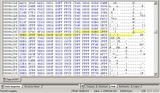
The yellow highlighted part is one car. As some people may notice, this is a Lexus and it's in the safehouse.
51000000B02FFF5BB02FFF5B02000F001F00CDCD
So this is the code from the image, I will break it down.
51000000 - This is simply a sort of index, this is unique per entry.
B02FFF5B - This first 'car' part will tell the Car Make & Model, like Corvette C6 or Audi A4 (Thnx to Koffy)
B02FFF5B - This second 'car' part is the model used for the car.
02 - This is the location of the car, where it can be found (garage, my cars, ect)
000F001F00 - Unknown, don't know what this part does yet - it may be worth checking.
CDCD - indicates the end of an entry.
The first entry like this can be found at adress 00005BC5 (in hex workshop, hex mode).
Every entry is 0x14 bytes long (in hex)
So the next car entry is at 00005BD9 and so on.
I will divide all of these entrys in 3 categories:
1. The first 31 entrys consist mostly of blacklist cars and bonus cars.
2. The 50 following entrys feature every 'normal' driveable car in the game.
3. After that are the cars you get in your garage or in 'my cars'.
You can find the first car of the 3rd cat. at adress 00006219 .
I'm not sure how many entrys are resevered for these cars.
If you look at the image again, the next carcode is this:
FFFFFFFF534B0579534B057942000F002001CDCD
Lets break it down again:
FFFFFFFF - notice that this part is 'null' , if you change it to the next logical sequence, in this case 52000000, you activate the car thats in the entry.
534B0579
534B0579
42
000F002001
CDCD
You guys already know what happens when you change the carcode and location code, so I will skip that.
Now comes the second part, in which you can change stuff like spoilers, rims, paint ect.
Naturely, both parts are linked.
So all the cars that car be modded or are already modded (blacklist, bonus) have an entry here that is linked to the entry in the first part.
The first entry in this second part is at 00006B65, and every entry is 0x198 bytes long (in hex)
So the next entry is at 00006CFD.
Once again, I will divide the cars in this part in 3 categories:
1. The first 31 entrys are also for blacklist cars and bonus cars.
2. Ow wait, cat. 2 cars are not in this part. This is because when you get a car from the carlot, you get it 'stock', with nothing on it. So there is no data in the savegame.
3. So now you get the cars can find in the garage or in 'my cars'.
Okay, check the image.

All this code is for one car, and makes up part 2 of a car in your savegame.
I know, it's a big piece of code, but you can change alot in it.
Again, this is a Lexus and it's linked to the car in the first image.
Now before I continue, I just found the locations of these codes.
So I know where I need to change tohe code in order the change the spoiler ect.
I DO NOT KNOW ALL THE CODES YET OR A VALUE TO CHANGE A CERTAIN PART TO ANOTHER. So don't ask ... yet.
Now, lets go on. I will break down the code posted in the image:
For better overview, I split the code into blocks.
The number in the beginning of a row indicates the number of the first block.
Just follow the number to see what value you have to change.
===========================================================================
First, perfromance parts.
This goes by 'level', I believe the Lexus has 4 levels of engine upgrades.
So to get max engine performance, set the engine value to 4.
However, not all cars got 4 levels of upgrades.
If a car has only 1 level of upgrade, set the engine value to 1 to get it to the max.
Performance Mods:
71) 01000000 <tires
72) 01000000 <brakes
73) 01000000 <suspension
74) 01000000 <transmission
75) 01000000 <engine
76) 01000000 <turbo
77) 01000000 <nitrous
78) 7F000000 <junkman
Junkman parts are a different story.
If you only want the junkman engine part, change it to 10
If you want transmission + suspension you have to add these values together IN HEX(!)
So that's 04 + 08 = 0C, get it ?
Junkman:
tires =01
brakes =02
suspension =04
transmission =08
engine =10
turbo =20
nitrous =40
everything =7f
===========================================================================
These are the parts mods.
For these, I only know locations ... Sorry, no values to change it to yet.
Parts Mods:
Spoilers
23) 9F0DA00D <First 4 Digits Defines SpoilerS
Hoods
32) 0B09D50D <5th & 6th Digit Defines Hoods
Roof Scoops
32) 0B09D50D <1st & 2nd Digit Defines Scoops
Rims
34) F80DFFFF <First 4 Digits Defines Rims
Body Kits
12) 830D850D <5th & 6th Digit Defines Body Kits
===========================================================================
These are the visual mods.
I only know what I posted here, so no decals and stuff like that.
Also for these, I only know locations ... Sorry, no values to change it to yet.
Visual Mods:
Rim Color
40) FFFFE10E <First 4 Digits Defines Rim Color
Paint
39) 8F0EFFFF <First 4 Digits Defines Paint
Windows Color
66) FFFF2315 <Last 4 Digits Defines Window Color
Vinyl
39) 8F0EFFFF <Last 4 Digits Defines Vinyl
40) FFFFE10E <Last 4 Digits Defines Vinyl Color 1
41) E30EFFFF <First 4 Digits Defines Vinyl Color 2
===========================================================================
The last thing I want to explain, is how the cars are linked ... thats easy.
Car Number 01: Part 1 starts at 00005BC5 & part 2 starts at 00006B65
Car Number 02: Part 1 starts at 00005BD9 & part 2 starts at 00006CFD
Car Number 03: Well, you get the point. Add 14 to the first number and 198 to the second. Don't forget to do it in hex.
But remember, we skip car 32 to 81 bacause we can't edit those ... these are 'stock'.
So continue to 82
Car Number 82: Part 1 starts at 00006219 & part 2 starts at 00009CCD
Car Number 83: Part 1 starts at 0000622d & part 2 starts at 00009E65
Car Number 84: Once again, you get the point.
***************************************************************************
I hope you guys learned alot from this and I really hope that with this info, alot of great tools can be created.
Sadly I have a couple of busy weeks ahead of me, so I won't be able to spend alot of time on this anymore.
The best advice I can you you, is to compare your savegames when you change something.
You should now know where the cardata is, so changes can be spotted faster I think.
Few things that should be researched are the values for specific parts and paint, like the value of a bodykit or a spoiler.
Everbody is free to improve this info, add to it or whatever.
Just remember to give the right people the credit they deserve.
It seems long, but I really tried to keep it short.
***************************************************************************
I want to start of with the part most people already know, the part I already provided some carlists for.
This is actualy 1 of 2 parst that make up a car in your savegame.
Notice the image.

The yellow highlighted part is one car. As some people may notice, this is a Lexus and it's in the safehouse.
51000000B02FFF5BB02FFF5B02000F001F00CDCD
So this is the code from the image, I will break it down.
51000000 - This is simply a sort of index, this is unique per entry.
B02FFF5B - This first 'car' part will tell the Car Make & Model, like Corvette C6 or Audi A4 (Thnx to Koffy)
B02FFF5B - This second 'car' part is the model used for the car.
02 - This is the location of the car, where it can be found (garage, my cars, ect)
000F001F00 - Unknown, don't know what this part does yet - it may be worth checking.
CDCD - indicates the end of an entry.
The first entry like this can be found at adress 00005BC5 (in hex workshop, hex mode).
Every entry is 0x14 bytes long (in hex)
So the next car entry is at 00005BD9 and so on.
I will divide all of these entrys in 3 categories:
1. The first 31 entrys consist mostly of blacklist cars and bonus cars.
2. The 50 following entrys feature every 'normal' driveable car in the game.
3. After that are the cars you get in your garage or in 'my cars'.
You can find the first car of the 3rd cat. at adress 00006219 .
I'm not sure how many entrys are resevered for these cars.
If you look at the image again, the next carcode is this:
FFFFFFFF534B0579534B057942000F002001CDCD
Lets break it down again:
FFFFFFFF - notice that this part is 'null' , if you change it to the next logical sequence, in this case 52000000, you activate the car thats in the entry.
534B0579
534B0579
42
000F002001
CDCD
You guys already know what happens when you change the carcode and location code, so I will skip that.
Now comes the second part, in which you can change stuff like spoilers, rims, paint ect.
Naturely, both parts are linked.
So all the cars that car be modded or are already modded (blacklist, bonus) have an entry here that is linked to the entry in the first part.
The first entry in this second part is at 00006B65, and every entry is 0x198 bytes long (in hex)
So the next entry is at 00006CFD.
Once again, I will divide the cars in this part in 3 categories:
1. The first 31 entrys are also for blacklist cars and bonus cars.
2. Ow wait, cat. 2 cars are not in this part. This is because when you get a car from the carlot, you get it 'stock', with nothing on it. So there is no data in the savegame.
3. So now you get the cars can find in the garage or in 'my cars'.
Okay, check the image.

All this code is for one car, and makes up part 2 of a car in your savegame.
I know, it's a big piece of code, but you can change alot in it.
Again, this is a Lexus and it's linked to the car in the first image.
Now before I continue, I just found the locations of these codes.
So I know where I need to change tohe code in order the change the spoiler ect.
I DO NOT KNOW ALL THE CODES YET OR A VALUE TO CHANGE A CERTAIN PART TO ANOTHER. So don't ask ... yet.
Now, lets go on. I will break down the code posted in the image:
For better overview, I split the code into blocks.
The number in the beginning of a row indicates the number of the first block.
Just follow the number to see what value you have to change.
Code: Select all
01) 580D590D 5B0D5D0D 5F0D610D 630D650D 670D690D 6B0D6D0D 6F0D710D 730D750D
09) 770D790D 7B0D7D0D 7F0D810D 830D850D 8B0D8C0D 8D0D8E0D 8F0D900D 910D920D
17) 930D940D 950D960D 970D980D 990D9A0D 9B0D9C0D 9D0D9E0D 9F0DA00D A10DA80D
25) AF0DB60D BD0DC40D CB0DCC0D CD0DCE0D CF0DD00D D10DD20D D30DD40D 0B09D50D
33) FFFFFFFF F80DFFFF FFFF0A23 F90DFA0D FB0D020E 090E100E 8F0EFFFF FFFFE10E
41) E30EFFFF E10EFFFF FFFFFFFF FFFFFFFF FFFFFFFF FFFFFFFF FFFFFFFF FFFFFFFF
49) FFFFFFFF FFFFFFFF FFFFFFFF FFFFFFFF FFFFFFFF FFFFFFFF FFFFFFFF FFFFFFFF
57) FFFFFFFF FFFFFFFF FFFFFFFF FFFFFFFF FFFFFFFF FFFFFFFF FFFFFFFF FFFFFFFF
65) FFFFFFFF FFFF2315 5427711E 711E6F1E FFFFFFFF FFFFCDCD 01000000 01000000
73) 01000000 01000000 01000000 01000000 01000000 7F000000 00000000 00000000
81) 00000000 00000000 00000000 00000000 00000000 00000000 00000000 00000000
89) 00000000 00000000 00000000 00000000 00000000 00000000 00000000 00000000
97) 00000000 00000000 00000000 00000000 00000000 1FCDCDCD
First, perfromance parts.
This goes by 'level', I believe the Lexus has 4 levels of engine upgrades.
So to get max engine performance, set the engine value to 4.
However, not all cars got 4 levels of upgrades.
If a car has only 1 level of upgrade, set the engine value to 1 to get it to the max.
Performance Mods:
71) 01000000 <tires
72) 01000000 <brakes
73) 01000000 <suspension
74) 01000000 <transmission
75) 01000000 <engine
76) 01000000 <turbo
77) 01000000 <nitrous
78) 7F000000 <junkman
Junkman parts are a different story.
If you only want the junkman engine part, change it to 10
If you want transmission + suspension you have to add these values together IN HEX(!)
So that's 04 + 08 = 0C, get it ?
Junkman:
tires =01
brakes =02
suspension =04
transmission =08
engine =10
turbo =20
nitrous =40
everything =7f
===========================================================================
These are the parts mods.
For these, I only know locations ... Sorry, no values to change it to yet.
Parts Mods:
Spoilers
23) 9F0DA00D <First 4 Digits Defines SpoilerS
Hoods
32) 0B09D50D <5th & 6th Digit Defines Hoods
Roof Scoops
32) 0B09D50D <1st & 2nd Digit Defines Scoops
Rims
34) F80DFFFF <First 4 Digits Defines Rims
Body Kits
12) 830D850D <5th & 6th Digit Defines Body Kits
===========================================================================
These are the visual mods.
I only know what I posted here, so no decals and stuff like that.
Also for these, I only know locations ... Sorry, no values to change it to yet.
Visual Mods:
Rim Color
40) FFFFE10E <First 4 Digits Defines Rim Color
Paint
39) 8F0EFFFF <First 4 Digits Defines Paint
Windows Color
66) FFFF2315 <Last 4 Digits Defines Window Color
Vinyl
39) 8F0EFFFF <Last 4 Digits Defines Vinyl
40) FFFFE10E <Last 4 Digits Defines Vinyl Color 1
41) E30EFFFF <First 4 Digits Defines Vinyl Color 2
===========================================================================
The last thing I want to explain, is how the cars are linked ... thats easy.
Car Number 01: Part 1 starts at 00005BC5 & part 2 starts at 00006B65
Car Number 02: Part 1 starts at 00005BD9 & part 2 starts at 00006CFD
Car Number 03: Well, you get the point. Add 14 to the first number and 198 to the second. Don't forget to do it in hex.
But remember, we skip car 32 to 81 bacause we can't edit those ... these are 'stock'.
So continue to 82
Car Number 82: Part 1 starts at 00006219 & part 2 starts at 00009CCD
Car Number 83: Part 1 starts at 0000622d & part 2 starts at 00009E65
Car Number 84: Once again, you get the point.
***************************************************************************
I hope you guys learned alot from this and I really hope that with this info, alot of great tools can be created.
Sadly I have a couple of busy weeks ahead of me, so I won't be able to spend alot of time on this anymore.
The best advice I can you you, is to compare your savegames when you change something.
You should now know where the cardata is, so changes can be spotted faster I think.
Few things that should be researched are the values for specific parts and paint, like the value of a bodykit or a spoiler.
Everbody is free to improve this info, add to it or whatever.
Just remember to give the right people the credit they deserve.

BMW M3 with original vynil & Black List cars
Sup everyone, hey koffy, about the blacklist cars:
Im new here, but this the deal:
I manage to get the BMW M3 at the start of the game... so what? well, this one have the ORIGINAL VYNIL, yep, the blue stripes and all (when I unlocked the M3 with the help in this forum it was the red one).
and I HAVE THE BLACKLIST CARS AT THE START OF CAREER (with its original vynils and all) in the same way but they're locked (yes, locked in your safe house...strange), u cant use them until u defeat the rival.
using the hex program remplace any car in your safehouse (I used the Fiat Punto) so...
5100 0000 00 <-first car slot (it can change sometimes)
next to it write the code of the car u want (if i want the Blacklist evo VIII use the evo car code)
Evo: B6FBEECCB6FBEECC
now search the blacklist Evo (the same code with the "08" next to it) and copy the next 12 numbers of the right: 08 000F 000E FF
remplace your first car slot with all the code of the black list car, change the 08 at the end to 02 for safehouse and the "FF" to 01:
B6FBEECCB6FBEECC 02 000F 000E 01
now you will have a locked blacklist Evo VIII in your safehouse (u need to defeat the rival to use it)
this can be made with all the blacklistcars just change the car code. The BMW is ok no need to be unlocked, but i dunno why is not the same with the other cars....
pd. If someone can turn this post into a easy one description please Do IT
Im new here, but this the deal:
I manage to get the BMW M3 at the start of the game... so what? well, this one have the ORIGINAL VYNIL, yep, the blue stripes and all (when I unlocked the M3 with the help in this forum it was the red one).
and I HAVE THE BLACKLIST CARS AT THE START OF CAREER (with its original vynils and all) in the same way but they're locked (yes, locked in your safe house...strange), u cant use them until u defeat the rival.
using the hex program remplace any car in your safehouse (I used the Fiat Punto) so...
5100 0000 00 <-first car slot (it can change sometimes)
next to it write the code of the car u want (if i want the Blacklist evo VIII use the evo car code)
Evo: B6FBEECCB6FBEECC
now search the blacklist Evo (the same code with the "08" next to it) and copy the next 12 numbers of the right: 08 000F 000E FF
remplace your first car slot with all the code of the black list car, change the 08 at the end to 02 for safehouse and the "FF" to 01:
B6FBEECCB6FBEECC 02 000F 000E 01
now you will have a locked blacklist Evo VIII in your safehouse (u need to defeat the rival to use it)
this can be made with all the blacklistcars just change the car code. The BMW is ok no need to be unlocked, but i dunno why is not the same with the other cars....
pd. If someone can turn this post into a easy one description please Do IT
- Attachments
-
- bmw m3 original vynil
Last edited by ManMan on 13 Jan 2006, 11:21, edited 2 times in total.


its something with the last numbers of the code, in the end line u have to change the "FF" to "01" if u don't, u still have the pinkslip car, but it crashes when entering the car select mode in ur safehouse.
maybe comparing the hex codes from the blacklist cars with a finished savefile hex codes. they may be differents...
I used the codes from the BMW M3 from a finished game file and paste it into the new save file...
maybe comparing the hex codes from the blacklist cars with a finished savefile hex codes. they may be differents...
I used the codes from the BMW M3 from a finished game file and paste it into the new save file...

