Page 1 of 7
Official NFSC Performance\Bug\Error Issues Thread.
Posted: 01 Nov 2006, 14:51
by Abrams
Aight seems like alot of topics come out about errors\unability to run a game. So lets put em all in one thread. Thread is for both demo and full version. All platfroms ofc.
First of all most common problems:
- Black screen and crash\White textures\Errors on startup.
* check video card driver version.
* check if your system meets req`s.
* check other hardware drivers or maybe its your antivirus messing things up.
- Laptop VGA doesnt work.
* check if you got supported chipset and memory amount.
* EA did warn that small versions of supported GPU`s might work and might not work.
All questions about 'will i run game?' also go here as well.
Posted: 02 Nov 2006, 05:16
by frankie123
CTD twice today dunno y
Posted: 02 Nov 2006, 07:32
by corvyz6
i get crashes when it autosaves, its exits and i have to go back in and after few minutes, again....
EDIT:
- my vid card uses old driver coz it doesnt work with new one.
- my comp is able to hold med settings nfsc
- i dont have antivirus
Posted: 02 Nov 2006, 13:16
by Prelude
Hey, I know this is off topic, but I need some help. I'm stuck at the installation. First, I start the setup.exe file, then next.......I type the CD key in, and a please wait window appears, then nothing happens......
What should I do? I got the min. sys. req.
Posted: 02 Nov 2006, 15:07
by Abrams
corvy try turning autosave off, maybe something wrong with it, at least it wont crash.
and prelude, you might trying to see in the task manager if setup keeps running after that window appears, should be named setup.exe or nfscsetup.exe or something like that. If you do see such process there, then just wait. If not then thats possibly something with CD maybe?
Posted: 03 Nov 2006, 13:24
by Leftos
I'm constantly getting CTD's after Loading screens, and I'm using one of the latest drivers, 91.47 or something. It doesn't happen always, but very frequently after finishing an online game and pressing Enter to return to the lobby.
Posted: 03 Nov 2006, 22:37
by Lumber
Hey guys, I've been having a problem too, don't know if any of you have had this but when I load the game this is what happens:

The graphics seems to be all messed up and I got NVIDIA GeForce4 MX 440
Can anyone help me? Please?

Thanks in advance for reading/helping,
/Gabriel
Posted: 03 Nov 2006, 23:33
by vellu
Supported GPU's:
Graphics card with 64MB or more RAM with the following GPU
NVIDIA GeForce4 Ti-4200
NVIDIA GeForce4 Ti-4400
NVIDIA GeForce4 Ti-4600
NVIDIA GeForce4 Ti-4800
NVIDIA GeForce FX Series
NVIDIA GeForce 6200
NVIDIA GeForce 6600
NVIDIA GeForce 6800
NVIDIA GeForce 7300
NVIDIA GeForce 7600
NVIDIA GeForce 7800
NVIDIA GeForce 7900
ATI Radeon 8500
ATI Radeon 9000
ATI Radeon 9100
ATI Radeon 9200
ATI Radeon 9500
ATI Radeon 9550
ATI Radeon 9600
ATI Radeon 9700
ATI Radeon 9800
ATI Radeon X300
ATI Radeon X550
ATI Radeon X600
ATI Radeon X700
ATI Radeon X800
ATI Radeon X850
ATI Radeon X1300
ATI Radeon X1600
ATI Radeon X1800
ATI Radeon X1900
Anything newer...
Supported resolutions: 640x480 / 800x600 / 1024x768 / 1280x1024 / 1600x1200
NVIDIA GeForce MX-Series not supported
So, Lumber, you need to upgrade your gfx card in order to play...
Posted: 03 Nov 2006, 23:44
by Lumber
vellu wrote:Supported GPU's:
Graphics card with 64MB or more RAM with the following GPU
NVIDIA GeForce4 Ti-4200
NVIDIA GeForce4 Ti-4400
NVIDIA GeForce4 Ti-4600
NVIDIA GeForce4 Ti-4800
NVIDIA GeForce FX Series
NVIDIA GeForce 6200
NVIDIA GeForce 6600
NVIDIA GeForce 6800
NVIDIA GeForce 7300
NVIDIA GeForce 7600
NVIDIA GeForce 7800
NVIDIA GeForce 7900
ATI Radeon 8500
ATI Radeon 9000
ATI Radeon 9100
ATI Radeon 9200
ATI Radeon 9500
ATI Radeon 9550
ATI Radeon 9600
ATI Radeon 9700
ATI Radeon 9800
ATI Radeon X300
ATI Radeon X550
ATI Radeon X600
ATI Radeon X700
ATI Radeon X800
ATI Radeon X850
ATI Radeon X1300
ATI Radeon X1600
ATI Radeon X1800
ATI Radeon X1900
Anything newer...
Supported resolutions: 640x480 / 800x600 / 1024x768 / 1280x1024 / 1600x1200
NVIDIA GeForce MX-Series not supported
So, Lumber, you need to upgrade your gfx card in order to play...
How do I update?
Posted: 03 Nov 2006, 23:56
by DeMyX
You need to buy a new gfx card.
Since your already getting a new gfx card I recommend higher than X1600 or Nvidia 7900.
Just so it lasts for a while.
Posted: 03 Nov 2006, 23:57
by corvyz6
buy a new video card
Posted: 04 Nov 2006, 01:20
by WonkaVW
Only issue I'm having is that the game seems to freeze upon exiting to Windows. I have to Ctrl-Alt-Del it to close. Performance is good though and the graphics are nice.
Posted: 04 Nov 2006, 04:23
by hexicon
I had that problem also. What fixed it for me (I am using Vista) was to run it as an admin and give it all permissions. Still takes a good 20 seconds to return to Windows it is better than the 5+ minutes (yes, minutes) it was taking before.
WonkaVW wrote:Only issue I'm having is that the game seems to freeze upon exiting to Windows. I have to Ctrl-Alt-Del it to close. Performance is good though and the graphics are nice.
Posted: 04 Nov 2006, 04:43
by corvyz6
Abrams wrote:corvy try turning autosave off, maybe something wrong with it, at least it wont crash.
i turned it off, still got a crashed, im startin to think its not the autosave thing, it might be something else
Posted: 04 Nov 2006, 08:01
by Jmac-
DeMyX wrote:You need to buy a new gfx card.
Since your already getting a new gfx card I recommend higher than X1600 or Nvidia 7900.
Just so it lasts for a while.
MX440 is only AGP or PCI, so the 7900 is out of the question because, as far as I'm aware, you can't get a 7900 in AGP (definitely not in PCI) ...
For AGP, you can find a few 7600GTs, 7800GSs, or X1650 Pros ... I'd get the 7600GT if you can find one ...
Posted: 04 Nov 2006, 09:06
by BrontoX
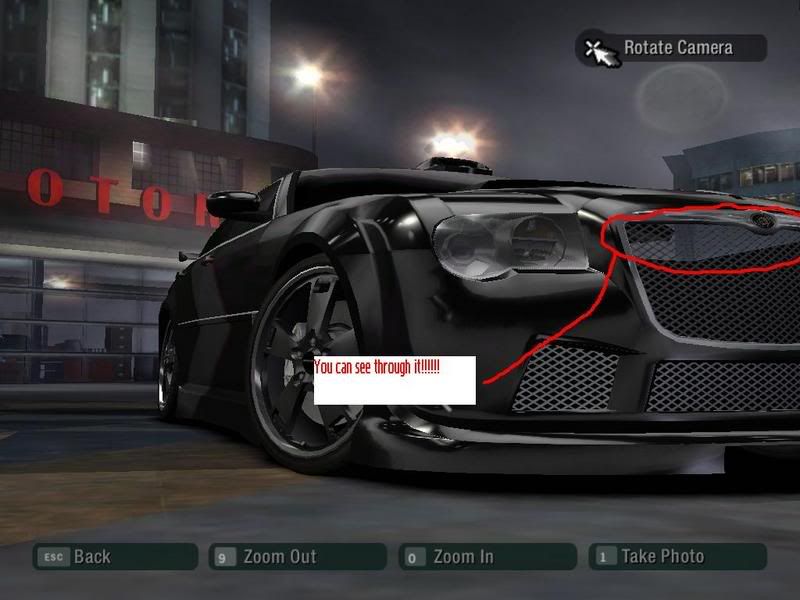
Here is a bug i found in the game it's not a problem but since this is a bug repoting topic here is one bug:
Posted: 04 Nov 2006, 18:47
by Business
Ridiculous. the game has crashed over 2 dozen times now for no reason. after the very first crash i turned off autosave and it still does it.
the most frequent crashes are right after a race, especially if i won something (bitter ai?) or right before the race starts and im revving my engine. thanks for making me a beta tester EA.
Posted: 05 Nov 2006, 03:15
by Frostbite
I too have crashing problems...but only after a race...sad really just finished half of the game...and now this
oh well at least I can still play using freeroam
(btw it crashes w/ and w/o autosave...Imma fittle with my video settings...)
Posted: 05 Nov 2006, 03:26
by xturbo
@Brontox: also there's a bug like that in MW, just apply one of the bodykits in the Lambo Murcielago and see throught the vents at the rear hood, u will see that u can see the road through those vents, but it's not as visible as that one from carbon...
Posted: 05 Nov 2006, 08:03
by mko
horrible keyboard response possible due to bad graphic performance on my reasonably good computer.
AMD 3800+ Dual Core
XFX Nvidia 7800GT Stock O/C
DFI LanParty UT NForce4 Expert
Soundblaster Audigy
74Gb Segate Raptor
Windows XP
Seems as though Shader Detail set on High creates the worst lag, but also when there are plenty of cars about, the keyboard controls are so laggy that the lag causes me to crash quite often during the start of a race, since I'll hit the left button to steer left, then it responds 3-4 seconds later!
Posted: 05 Nov 2006, 10:19
by vellu
Lag with that? Must be some other reason then overall performance, what resolution are you using? My rig isn't anywhere near yours and I can play smoothly at 1024x768/2xAA.
Posted: 05 Nov 2006, 11:09
by Leftos
I've managed to get over the crashing and 5 minutes of wait before quitting. It seems to be all about NFSC's online part on the PC. I've disabled any web access from NFSC and now that the game cannot connect to EA Nation, I've never had a crash and the game quits instantly.
Oh, and that fix also means no multiplayer at all. But on my 768/192 connection multiplayer wasn't fun at all anyway, there was huge lag even when I was racing with just one opponent. When it was more than one, they would all disappear and I'd have to wait for their times after the race. Cooooool... not.
Posted: 05 Nov 2006, 17:24
by cosmo21
When it loads, like that lil window with two car driftin' thingy, it's still ok till it goes black and restarts pc...
Game: NFSC Collector's Edition
PC:
Processor: Pentium D 3.0 Ghz (Pass)
Memory: Hard Drive 250 GB (Pass)
Optical Drive: DVD/CD Writer Lightscribe (Pass)
Video Card: Radeon X1300 (Pass)
And others also passed...
Those are the major things and they come in stock parts in my computer, so mostly they won't crash, I've also checked that they all have new drivers... And I just rebooted my pc recently so it has no viruses... Any help?
If yea, would you mind e-mailing me instead? cuz i don't go on this forum commonly...

Pretty Pweeze!
My e-mail is :
[email protected]
Posted: 05 Nov 2006, 22:41
by Business
well i found something quite startling...i decided to go ahead and run NVTemplogger while playing. it records the temperature in increments of 5-6 seconds. i'll make it easy on you and do every 2 minutes. fyi, CT is core temperature for the gpu, AT is ambient temperature of the case:
start
15:11:33 | CT : 63 C AT : 48 C
15:13:00 | CT : 63 C AT : 48 C
15:15:04 | CT : 63 C AT : 48 C
15:17:06 | CT : 63 C AT : 48 C
15:19:01 | CT : 60 C AT : 45 C
15:21:02 | CT : 57 C AT : 42 C (note that this is while im messing around with the settings and vinyls)
15:23:02 | CT : 68 C AT : 44 C (spike! im playing now!)
15:25:07 | CT : 76 C AT : 51 C
15:27:02 | CT : 78 C AT : 54 C (not good)
15:29:02 | CT : 78 C AT : 54 C
15:31:05 | CT : 76 C AT : 54 C
15:33:21 | CT : 81 C AT : 55 C (81°c = 178°f)
15:35:05 | CT : 79 C AT : 55 C
15:35:36 | CT : 79 C AT : 55 C (crashed to desktop)
wondering what my current temps are right now? 10 minutes after CTD:
15:46:59 | CT : 55 C AT : 39 C (77° F difference on the core)
and i just noticed my side window fan in my case is not running. get NVtemplogger and check your temperatures!!!
Posted: 05 Nov 2006, 23:27
by Frostbite
I've narrowed my crashing down to the scene where you first meet Wolf. Since my game keeps crashing whenever I finish a race at Wolf's TFK area...=(
