Page 1 of 1
NFSU1: Decal Editing
Posted: 19 Jul 2004, 17:47
by simonvallore
is there a way to make your own decals and put them on the front wind shield ???
Edited by SuperRacer: this is now the official decal editing discussion thread.
Posted: 19 Jul 2004, 17:57
by KekumRulez
Yes, there is.
Check
this summarize (doc) I made from tips from MikeFarrer. And there is a topic somewhere on forum where he shows some selfmade decals
wcat read it
Posted: 19 Jul 2004, 18:07
by simonvallore
it wont let me read it
Posted: 19 Jul 2004, 18:41
by KekumRulez
Click right-mouse-button, save target as. or go to
here If it after that still (...try FIRST) not work, PM me, so à can eventually mail it to you.
Posted: 19 Jul 2004, 19:42
by ^Sparco^
It works for me clicking the link. And I have created 1decal
well
Posted: 20 Jul 2004, 03:33
by simonvallore
well i have paint shop pro 8 so what do i do since i need paint shop pro 7???
Posted: 20 Jul 2004, 04:07
by Simon600
U should try to get photo shop 7 from kazaa or something i found it alot more conpatible with moding games, and there is all sorts of plugins for file types for photo shop to reconeize.
help
Posted: 20 Jul 2004, 18:16
by simonvallore
ok i did ecatly as the tutorial said and well its still the same old aem logo and not my logo also is there some one who will give me a copy of there texture files for the miata and rx7 i kinda messed mine up
Posted: 23 Jul 2004, 13:25
by ^Sparco^
uhm... Im sure what is your problem. There are 3sizes of decals. You might used an incorrect size.
256x32 -> Windshield, Rear window
256x64 -> Hood, doors, rear quarter
128x32 -> ???
Posted: 24 Jul 2004, 08:11
by MikeFarrar
Posted: 28 Jul 2004, 12:19
by ^Sparco^
Ok, my ricer windows pack is uploaded. You can see/download it
here 
Posted: 28 Jul 2004, 12:32
by KekumRulez
Well, Ive made the info as a webpage
To make things easier
go here >>>>>
HOw to make decals, powered by MikeFand KekumRulez <<<<<
This tutorial is (c)MikeF. All other content on the site the tutorial is "hosted" on is (c)KekumRulez aka Mike
Posted: 10 Aug 2004, 20:19
by ViperJay
men, I've tried but I've a problem...
I use photoshop CS...how can I make the alpha? I mean how can I do the "open like alpha"?
Posted: 10 Aug 2004, 22:13
by ^Sparco^
Viper you can't open like Alpha with Photoshop. You need the other program called Graphics Converter 3 to do this things, as the tutorial says.
BTW I decided to come back-... I love this site

Posted: 11 Aug 2004, 21:03
by ViperJay
ok, tnx, I'll get it.
...You did right coming back
Posted: 11 Aug 2004, 21:09
by exonn
guys you are using very hard tutorial... i use only photoshop to make decals, and why are you saying that you cant make alpha in photoshop? eweryting is wery simple. just make a decal and save it as dds, then close your decal and open it again in photoshop, swich to chanels and you gona see that alpha chanel is created too, then just copy your decal to alpha chanel and save a decal... thats all... ges its more simple than using 2 programs for making alpha...
Posted: 13 Aug 2004, 16:33
by Drewb99
And I now present-
- Drewb99's Braindead Easy Way of Doing It -
Step 1: In an image editing program, make a non-RLE compressed TGA file with transparancy wherever you want it.
Step 2: Run
This
Step 3: Import via Bintex
Step 4: Save
Step 5: Enjoy!
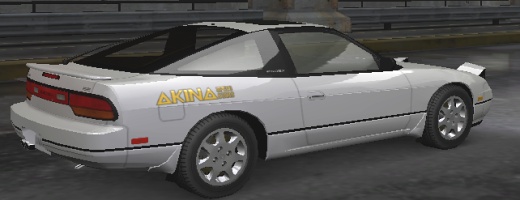
Posted: 13 Aug 2004, 22:36
by ViperJay
oh, good thing I heard exon...I'll try right now as you say

Posted: 14 Aug 2004, 01:52
by exonn
i have read tutorial about making decals and found it wery har, then i thougt: there must be an easyer way to make decals! and hear we go!!!! its much easyer to make new decals as i wrote it before....
